Tuesday, July 11, 2017

Boost Your Rankings With the Ultimate Local SEO Cheat Sheet (Infographic)

Reader Resource

Apply now to be an Entrepreneur 360™ company. Let us tell the world your success story.Get Started »

Here’s a question for you…where does your business appear in search engine results?

First page? Second page? Even further back?

The fact of the matter is, where your business lands in search engine results matters, quite a bit in fact. The closer you are to the top of the first page, the more likely your potential customers are to click.

Take a look at this graph from a study conducted by Moz:
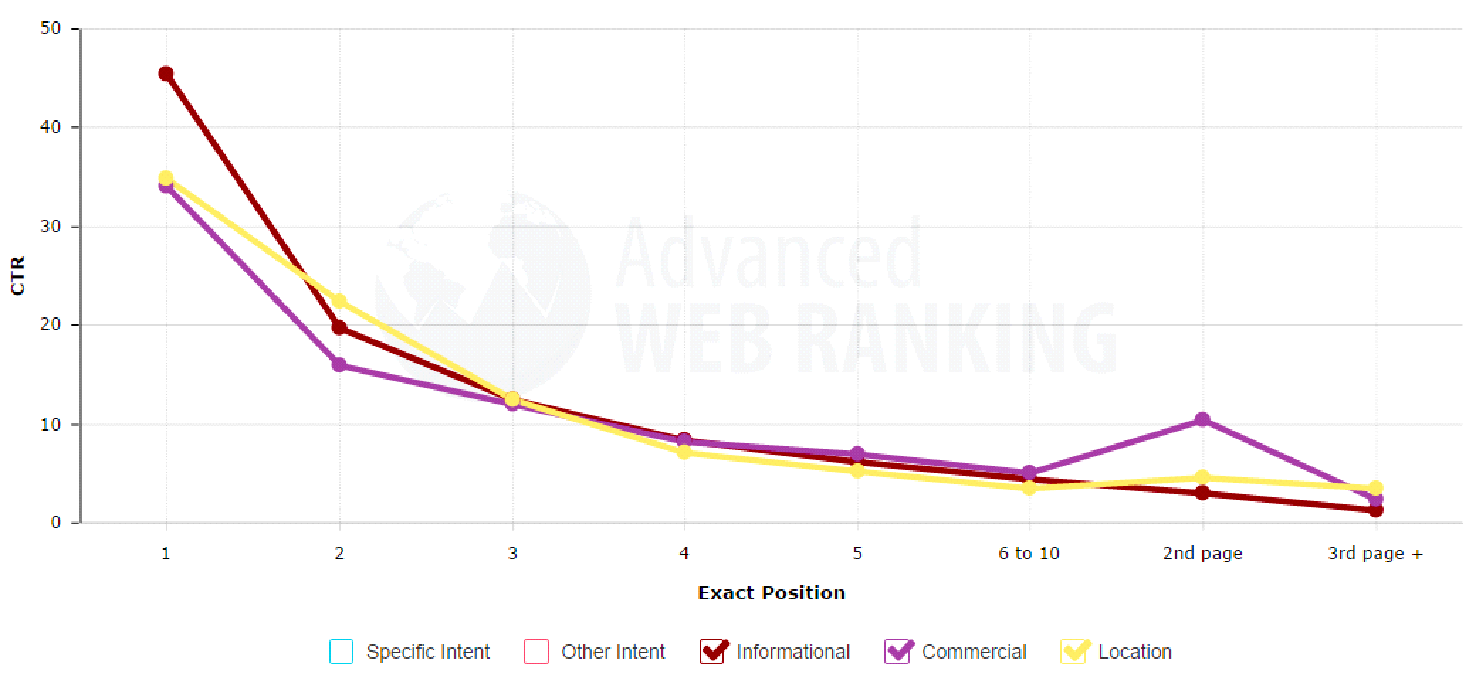
Image Credit: Moz

It highlights the click through rate of website results based on specific intent. So, for instance, if someone is performing a search based on a specific location, approximately 35% of people will click on the first result.

From there, the numbers drop significantly. If your business happens to be on the second page of the search engine results then the click through rate to your site is going to be a dismal 5%.

No business wants that.

So what can you do? No doubt you’ve heard about SEO (search engine optimization), but chances are you’ve just been too busy actually running your business to really dive deep into it. Plus, it seems pretty complicated. Can a local business owner really tackle this?

The answer is a resounding yes!

In fact, if you want to learn how to easily optimize your site, get your SEO skills up and running, improve your website search result rankings, and get more customers from it, then keep reading.

Image Credit: Pickaweb

Set Up and Optimize Local Listings

The first thing you need to do to get started is make sure your local listings are set up. This is one of the keys to be found in local searches.

Start by providing your information with the following sites:

Here, you really want to go above and beyond when it comes to information. Include more than just the basics like your business name, contact information, and hours. Include keywords and an introduction on what your business does, point your location out on a map, even include social media information, photos and videos.

The more information the better, it will all help you get found by your customers online.

Get Reviews

Reviews are an incredibly important key to success for any local business. Let’s face it, word of mouth marketing is one of the most successful marketing channels out there. Nielsen found that:

“84 percent of consumers say they either completely or somewhat trust recommendations from family, colleagues, and friends about products and services.”

In another study, BrightLocal learned:

“88 percent of people trust online reviews written by other consumers as much as they trust recommendations from personal contacts.”

Convinced of how important reviews are yet?

If you still need convicing then just check the results in Google for your local area. Which businesses tend to appear at the top? Can you spot a trend? You got it — it’s generally the sites that have the most Google reviews.

Now, there are a couple of ways to go about getting reviews for your business. First, simply ask. Get into the habit of asking customers to leave reviews online. Start with your most frequent, favorite, or best customers.

Remember, this strategy is one that is going to be much more long term. Don’t run around trying to build up reviews overnight, instead, focus on steadily adding a few every week. Over time, all those positive reviews will both help to improve your ranking, and will spread your brand’s name via word of mouth.

Add Name, Address & Phone Citations

In essence, Name, Address, and Phone citations (called NAP Citations) for short, are basically just places online where your business is listed. This is a big area that you do not want to ignore because it can reap huge benefits for you down the line.

The biggest reason for having as many NAP Citations as possible is because for every site your business is listed on, it counts as a backlink that points back to your website. Backlinks are incredibly important for search engine results.

Just take this tidbit from Moz:

“Citations are a key component of the ranking algorithms in Google and Bing. Other factors being equal, businesses with a greater number of citations will probably rank higher than businesses with fewer citations.“

So, if you’re operating in a competitive space like a pizza shop, for example, having your business consistently adding NAP Citations monthly can help make you stand out from all the other pizza shops in your local area.

Here are some examples of places where you can start adding your business. Keep in mind, that in different countries certain sites are going to be more important than others. Here’s a quick list to get you started:

Search your local area and country on a regular basis for more sites where you can add NAP Citations and keep doing it on a monthly basis.

Just as with NAP Citations, you also want to include your business in as many industry directories as possible as well. If you aren’t sure exactly what directories to be in, start by looking up a few of your competitors.

Improve Your Content (and Add a Blog)

Having a lot of really high quality content is also a great way to improve your SEO rankings and search engine results. It doesn’t matter what type of business you’re in, every brand can benefit from having a blog up and running on their site. It’s the perfect way to start providing your potential customers with a lot of value.

If you’re thinking that you’re not even sure what kind of content you would put on a blog, consider the following:

  • Buyer’s guides

  • Best practices

  • Testimonials and case studies

  • Local tips

  • Local features

  • Frequently asked questions

  • Latest trends

And that’s to just get started, when it comes to blogging, there are endless possibilities if you can get a little creative. Search engines always prefer sites with quality content that are updated on a frequent basis, do that and you’ll be in very good shape.

Remember, the goal of a blog is to drive traffic to your website, build your authority, and increase conversions, that is turn potential customers into actual customers. Do that by showering your website visitors with tons of useful, engaging, and valuable information.

Write interesting posts that are at least 500 words (that’s the minimum – ideally 750 to 1000 words), include video links and other social media as well, highlight your products, services and happy customers. And, be sure to optimize each post for best success (keep reading to find out how).

Optimize Your Website for SEO

Some of the quickest and easiest wins when it comes to SEO can be achieved just by taking a bit of time to optimize your website.

This doesn’t mean some sort of big overhaul, in fact, you’d be surprised to find out just how many businesses skip this step and then wonder why they are stuck at the bottom of page two of the search results. Don’t let this be you!

Even taking care of the simplest of things can give you a leg up.

Here’s where to get started:

  • Create target keywords for each page of your website

  • Have unique meta tags (i.e. titles and descriptions for each page)

  • Make sure to include keywords in your URLs (especially for products or services)

  • Include your target keywords in your headings on both pages and content

  • Check to see you have included your target keyword 2-3 times on each page (but don’t go overboard)

  • Link to posts and pages from within your site

  • Optimize any images or videos that you have included

  • Add outside links to your site like from social media profiles and directories

  • Be sure your site is responsive (can easily be viewed on mobile devices)

Those are the basics, and even just taking care of those will help improve your rankings over both the long term and the short term. Remember, any additional content you include on your site, be it a blog post or a new service, you want to be sure it is optimized.

Lastly, when it comes to optimization, don’t forget both speed and security. The majority of people who visit a site will leave if it doesn’t load quickly, and that’s for both desktop and mobile devices.

Run a speedtest to see how quickly your site loads, and if it feels like it’s lagging, consider upgrading to super fast SSD hosting.

Hand in hand with speed comes security as well, especially if your customers can buy on your site, you want to be 100% sure it is secure, which is one way to really build more trust with your customers.

Consider upgrading your current site to HTTPS so that your entire site becomes completely secure. You’ll need an SSL Certificate for this. But don’t think this is just for eCommerce sites that accept payments. HTTPS is a stated Google ranking factor so it can give you can futireproof your website and get an advantage over the competition.

Final Thoughts

By now, you should have a very good idea of what you need to do in order to get your site up to scratch and optimized to get the best local SEO results.

Start with the basics like local listings and make sure you start picking up reviews. Get regular NAP Citations and create more content on your website. Make sure that you get the SEO basics right like optimizing every page and consider upgrading to superfast hosting and securiing your site with an SSL certificate to make it HTTPS.

If you follow each of the steps you see in the cheatsheet, you’re going to be be well on your way to higher rankings and more happy customers — a perfect combination. 

https://www.entrepreneur.com/article/276680

On – 27 Jun, 2017 By Tony Messer


source https://andlocal.org/boost-your-rankings-with-the-ultimate-local-seo-cheat-sheet-infographic/


Ultimate guide to small business SEO • Yoast

Tuesday, June 20, 2017

How SEO and UX Work Together to Drive Your Business

How SEO & UX Work Together to Drive Your Business
  • 2.5K
    READS

The expectations of online customers have changed dramatically over the years. When the internet was in its infancy, no one knew what they wanted or what to expect. However, now customers have been online for a long time and they know what they want from a website.

As customers have become smarter, search engines have adapted how they interpret and display information based on the modification of user intent. This is the result of evolving online environments that have shaped how customers interact with content.

No matter how someone finds and consumes your content, they have certain expectations when they interact with your brand. Every business must adapt.

That’s why it’s critical for businesses to combine user experience (UX) and search engine optimization (SEO) strategies. Doing so will ensure more conversions and help you maintain a competitive advantage. Focusing on only one of these will result in sub-optimal experiences for your customers and less revenue.

Let’s look at how SEO and UX work together to drive more conversions for your business.

The Common Goals of SEO and UX

The goal of every business is to make money.

No matter your industry, you depend on your website to build trust, answer questions, provide services, and sell products.

You depend on a holistic online presence to drive qualified traffic and increase conversions on your website. This means that you need to maximize your search engine visibility while also optimizing your website.

Your customers have specific problems, and they turn to search engines to find their answers. Once they find a website that meets their needs, they expect a great experience.

This is why SEO and UX need to work together. Put simply: UX + SEO = $.

SEO is mainly focused on external elements and the architecture of a website and usually looks to drive traffic to your website. UX is primarily focused on engaging customers once they reach your website and implementing a design that minimizes distraction to maximize conversions.

Driving traffic to your site is worthless unless that traffic is qualified. At the same time, the design of your website is useless if you don’t have any traffic to convert.

Collectively, SEO and UX need to focus on the intent of your users so your business produces a website that turns visitors into customers.

SEO and UX: BFFs <3

UX designers and SEOs were once competing against each other. Each thought their craft was better, and in many companies budget was divided between departments, so they had to fight to ensure adequate funding. However, as online marketing becomes more user-focused, many companies have discovered that SEO and UX work together to drive more sales.

Instead of competing, SEOs and UX teams should realize that they both focus on delivering a great experience at different stages of the customer’s journey. In fact, SEO and UX are two sides of the same coin.

Because search engine algorithms have evolved based on user experience, marketers have learned to use SEO and UX together to drive qualified leads and increase conversions on their website.

SEO and UX working together

How User Experience & SEO Affect Each Other

Today’s online interactions between your brand and customers are more diverse than ever. At the same time, your online customers are more informed and have more choices to solve their problems.

SEO has the data that UX teams need to produce personalized experiences for customers. At the same time, UX teams have the website framework and content optimization insight that SEOs need to make crucial decisions to ensure rankings in SERPs.

When SEO and UX teams share their findings, they can create optimized experiences for their users. Your business needs to make money through your website. You can’t do that by only focusing on technical SEO, or only looking at UX.

customer journey

How SEO Affects User Experience

Search engines use algorithms to identify patterns in how people search and what they are searching for online. Due to the nature of the industry, SEOs utilize different “levers” like keywords and links to rank their web properties in SERPs. This is the basic principle of SEO, so at its core, SEO focuses on identifying, publishing, and optimizing content that will attract qualified readers.

Just as keyword data indicates what prospective website visitors are looking for, this data is also vital for UX designers because it serves as a sample size of their overall audience. This information is even more important than ever as UX designers integrate SEO data to influence their development choices.

When you know what your customers are searching for and how your prospects search, it’s easier to make adjustments to your website so visitors can easily discover what they are looking for. SEOs can work with their UX teams to determine what pages on the website should be optimized to increase conversions.

Why UX Is Pivotal to the Future of SEO

While SEO data is great for highlighting general user trends, this information can’t pinpoint specific issues on a website that influences how individuals interact with website content.

A smooth and optimized website experience means that users spend more time engaging with the site and (hopefully) return to the site often. Great UX design is vital to the personal experience on a website.

Not only does UX influence how individuals perceive a website, but it can also positively impact how search engines view your website’s authority, relevance, and trust (which can indirectly improve your search rankings).

Website navigation is one of the biggest ways that UX impacts elements of SEO. For example, if users aren’t able to find the information they need quickly and easily through either the main navigation menu or how information is organized on a site then those users will leave without converting.

Great navigation is even more important today as a majority of traffic is coming from mobile devices. A couple of other UX factors that impact a site’s SEO include how fast your website loads and whether your content is engaging.

Google and other search engines know that where, how, and when people consume content is changing. As a result, UX teams need to work with their SEO counterparts to ensure that their website is optimized for their users just as much as it is optimized for search engines.

Using SEO and UX as Tools to Improve Your Business

Now that we have looked at how SEO and UX can drive qualified traffic and increase conversions for your company, it is time to improve your website based on the customer journey.

As search engines, your customers, and other technologies continue to evolve, your business must look at how to align your business assets with how your customers behave and engage with your content. Combining your SEO and UX efforts into a valuable strategy that will benefit your customers.

Image Credits

Featured Image: Pixabay
In-Post Images: Alex Alexakis

https://www.searchenginejournal.com/seo-ux-work-together/199840/

On – 13 Jun, 2017 By Chris Giarratana


source https://andlocal.org/how-seo-and-ux-work-together-to-drive-your-business/

Google Strikes Another Blow to Intrusive Ads: Here’s What You Need to Know

June 9, 2017

google-intrusive-ads.jpg

We all know those moments when we stumble upon what looks like a golden piece of content. And just as you’re about to dive in — an ad appears.

You can’t just close it, either. Before you can get to what you visited that site to see, you have to wait, as a countdown clock in the corner of the ad taunts you with, “Close this ad in 5 … 4 … 3 … ”

At this point, does anyone else just hit the “back” button with an angry mutter of, “Nevermind, I’ll read something else”? That’s because ads like these tarnish your online experience. They keep you from getting to the content you want to see. They’re intrusive. Google knows that — and now, it wants to prevent that from happening to Chrome users. >”>

Last Monday, Google announced that it would further crack down on websites that feature intrusive ads like these. And while that might sound great for many, what does it mean for content creators who rely on ad revenue? Don’t panic — you’re not doomed.

Below, we’ve broken down what marketers need to know about these new guidelines (spoiler alert: Google isn’t doing away with ads altogether), and what you can do to prepare for their rollout.

What’s New in Google Ad Blocking

A Better User Experience Without Revenue Loss

To repeat our earlier spoiler, it’s not Google’s intent to do away with ads completely. Rather, the goal appears to be for webmasters to move away from digital ads that interrupt a user’s content consumption — but not to lose critical ad revenue in the process.

The problem with intrusive ads, writes Google SVP of Ads & Commerce Sridhar Ramaswamy in the official announcement, is that they motivate users to install browser plugins that block ads altogether. And ultimately, that widespread blockage takes “a big toll on the content creators, journalists, web developers, and videographers who depend on ads to fund their content creation.”

Given Google’s algorithmic history, this announcement doesn’t exactly come as a surprise. It’s penalized sites with heavy above-the-fold ad content since 2012, and last year, it announced that mobile sites with intrusive pop-ups wouldn’t rank as well — both among consistent changes that, at least on the surface, appear to be motivated by an endless quest to improve user experience.

This particular move is largely the result of Google’s partnership with the Coalition for Better Ads, which recently developed Better Ads Standards — it appears that those standards serve as the foundation for Google’s new ad recommendations to content creators. Once publishers modify their ads to meet the new standards, they can then use Google’s Ad Experience Report to test if they’re in violation of the new standards.

The Penalty

But it’s not entirely clear how, in a broader sense, what the penalty will be for those in violation. The official announcement makes no mention of search ranking implications, though given the search engine’s history within this realm, we wouldn’t be surprised if websites in violation perform as well in search results.

What was clear in the announcement, however, is that within Google Chrome — which as of May 2017 had just over 63% of global desktop browser market share and 49% on mobile — the ads in violation of the new standards will be completely blocked. The browser already “prevents pop-ups in new tabs based on the fact that they are annoying,” Ramaswamy writes. Now, Google plans “to have Chrome stop showing ads (including those owned or served by Google) on websites that are not compliant with the Better Ads Standards starting in early 2018.”

The Criteria for “Bad Ads”

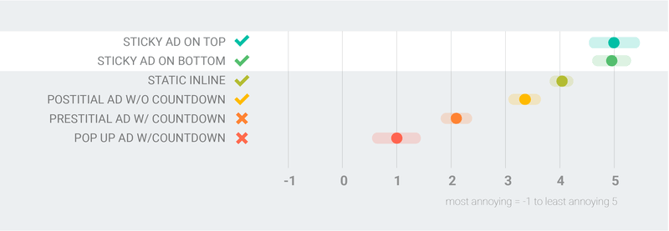
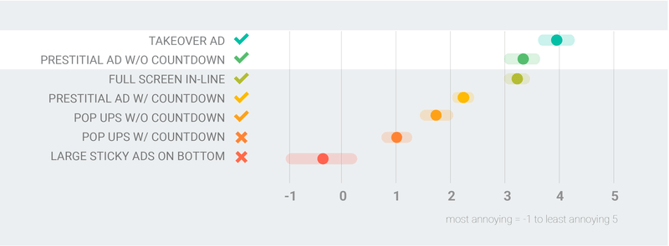
Using combined data from its own surveys and those conducted by The Coalition for Better Ads, Google outlined what constitutes a “bad ad” on its DoubleClick blog. Here’s a quick summary of the findings:

  • Ads that Interrupt. Remember those taunting countdowns we opened with? That counts as an ad that interrupts: one that “forces you to wait 10 seconds before you can” access the content you want. That’s especially true on mobile, where 74% of users would describe these ads as “extremely or very annoying.”
  • Ads that Distract. These are ads with ornate animation or that play loudly, automatically, as or after content loads. As one colleague said to me, speaking for many of us, “Those scare the heck out of me.”
  • Ads that Clutter. Many ads also cause a page’s load time to slow down. They’re what Google calls “high-density displays,” and they can make it even longer for users to get to the content they came to a site to see.

Google also created these handy images to show how much “bad ads” annoy mobile users: 

Mobile_Graph..max-800x800.pngSource: Google

… as well as those on desktop:

Desktop_Graph..max-800x800.pngSource: Google

3 Ways to Make Your Ads Better

Within the same DoubleClick post that outlines the worst practices for ad experiences, Google also lists three key elements of the best ones, which content creators can use to guide their revisions:

  1. Immediate. When ads themselves load quickly, and don’t slow a page’s load time, people tend to engage with them more. Using Google’s AMP framework for advertising can help — that’s what Time Inc. did, resulting in an increased clickthrough rate, among other measurables.
  2. Immersive. These are the ads that, in a way, assimilate with the content being viewed, making it less distracting and less likely to interrupt or interfere with the consumption experience. It’s part of what Google calls “native advertising,” in which ads are designed by the publisher of the site where they appear, and not by the advertiser. (Read more about that here.) That way, ads can more seamlessly fit in with your site’s format and purpose.
  3. Relevant. It’s never been easier to learn more about the people who are consuming your content, by tracking analytics or through simple research. Those are some of the things that comprise “programmatic technology,” Google says, and having that information can help content creators build ad experiences that are relevant to their users. And relevance, we’ve found, correlates with engagement — maybe that’s why 72% of marketers say creating relevant content was one of their most effective SEO strategies.

The 1 Thing You Should Do Right Now

Remember, Google says that these changes won’t fully take effect until early 2018. With that said, however, it’s never too early to start creating a better ad experience based on the criteria above, and using the tools provided by Google to determine if it meets the new standards.

And again — the official announcement may not have specifically stated any search ranking implications for those in violation of the new standards, but at risk of sounding like a broken record, Google’s algorithmic history has us suspecting that that could very well be the case.

When all else fails, put yourself in the shoes of a site visitor, and honestly determine if you have any of these responses to your own ad content:

  • I don’t care.
  • How do I make this go away?
  • No. Back to the search results.
  • GAH! That ad was LOUD!
  • I’m bored.

If any of those thoughts occur to you, then it’s probably time to revisit and re-strategize your ad experiences. We’ll be here to keep you posted on Google’s changes — and whatever implications come of them for marketers.

Will you change your ad experiences in response to the new standards? Let us know in the comments.

free trial of HubSpot's Website Platform

Topics: SEO


Subscribe to HubSpot’s Marketing Blog

Join 300,000+ fellow marketers! Get HubSpot’s latest marketing articles straight to your inbox. Enter your email address below:

https://blog.hubspot.com/marketing/google-ad-blocker

On – 09 Jun, 2017 By Amanda Zantal-Wiener


source https://andlocal.org/google-strikes-another-blow-to-intrusive-ads-heres-what-you-need-to-know/

Google: How to Create Better Meta Descriptions – Search Engine Journal

Google: How to Create Better Meta Descriptions


SEJ STAFF

Matt Southern

  • 8.6K
    READS

Google has released some recommendations regarding how to create better meta descriptions for search results.

In addition, Google is doing its part to improve meta descriptions by making a notable update to how they are rendered.

How Google Generates Meta Descriptions

When deciding which information to display in the snippet of a search result, Google will first turn to the content within the page itself and extract the most relevant information.

In the event that a page’s content is not the most relevant source based on the user’s query, Google will then turn to the manually written meta description to display in the search snippet.

Previously, if the page content was not the most relevant source for generating a snippet, and there was no meta description, Google would pull information from DMOZ. With DMOZ now closed, Google has stopped relying on the web directory for generating snippets.

With that being said, it has become more important than ever for site owners to write good meta descriptions. Google goes on to explain what it considers to be a good meta description.

“Good meta descriptions are short blurbs that describe accurately the content of the page. They are like a pitch that convince the user that the page is exactly what they’re looking for.”

The most common problems site owners need to watch out for when creating meta descriptions is neglecting to create them at all. Another issue is using the same meta description for all pages across the site. Other problems include writing off-topic, spammy, or low quality meta descriptions.

Google says there is technically no character limit to meta descriptions, but they will be truncated to fit the width of the device they’re being viewed on.

Going forward the NOODP robots directive, which prevented Google from using DMOZ to create snippets, no longer needs to be used.

https://www.searchenginejournal.com/google-create-better-meta-descriptions/201146/

On – 06 Jun, 2017 By Matt Southern


source https://andlocal.org/google-how-to-create-better-meta-descriptions-search-engine-journal/

Google Issues a Warning About Guest Posting to Build Links – Search Engine Journal

Google Issues a Warning About Guest Posting to Build Links


SEJ STAFF

Matt Southern

  • 15K
    READS

Google has issued a warning to remind site owners about the dangers of publishing content on other sites for the purpose of building inbound links.

The company doesn’t frown on guest posts or syndicated posts in general, but lately there has been an increase in spammy links stuffed into these types of posts. That’s the reason behind this sudden warning from Google.

Distributing content on a large scale when the main intention is to build links back to your own site is strictly prohibited under Google’s guidelines on link schemes.

What Google does allow are guest posts and syndicated posts which “inform users, educate another site’s audience or bring awareness to your cause or company.”

Google goes on to explain other article writing and distribution practices that are against its guidelines.

  • Stuffing keyword-rich links to your site in your articles.
  • Having the articles published across many different sites; alternatively, having a large number of articles on a few large, different sites.
  • Using or hiring article writers that aren’t knowledgeable about the topics they’re writing on.
  • Using the same or similar content across these articles; alternatively, duplicating the full content of articles found on your own site (in which case use of rel=”canonical”, in addition to rel=”nofollow”, is advised).

This probably goes without saying, but Google reminds being caught publishing articles with spammy links could affect the perceived quality of a site and thus affect search rankings. Site owners should be vigilant in their vetting of guest posts, and nofollow any links that appear questionable.

Google will also take action on websites creating the content in violation of Google’s guidelines. The company points out to site owners being harassed about publish content they can submit a complaint via Google’s spam report form.

https://www.searchenginejournal.com/google-issues-warning-guest-posting-build-links/200038/

On – 26 May, 2017 By Matt Southern


source https://andlocal.org/google-issues-a-warning-about-guest-posting-to-build-links-search-engine-journal/

Wednesday, May 31, 2017

3 Ways to Quickly Compare Your Website with Your Competitors – Search Engine Journal

3 Ways to Quickly Compare Your Website with Your Competitors
  • 3.8K
    READS

Comparing your site to your biggest competitors is useful for a variety of reasons. First, it helps you find missed opportunities. It also clues you into shifts in your industry which could help you stay ahead of the curve. It also gives you a benchmark for growth goals.

Reaching the top of the SERPs and staying there is more challenging now than ever. Although Google webmaster guidelines haven’t changed much over the years, the core algorithm has.

Thanks to regular updates, in addition to major ones like Knowledge Graph, Hummingbird, and RankBrain, Google is better able to filter out websites that don’t meet their standards and boost up sites that best satisfy those guidelines.

I’m not suggesting that you can “reverse engineer” Google’s algorithm. It’s far too complex. Still, a review of top ranking websites can be a good starting point for determining best practices. At the most basic level, a website can be broken down into these components:

  • Technology
  • Content
  • Backlinks

Here are three ways to compare your site to your competitors to see where your SEO could be doing better.

1. Website Technology

A well-structured website that is fast, easy to use, and easy to crawl should be every webmaster’s goal. You don’t need a specific technology to accomplish this, but if you’re starting with a new site or considering a redesign, it’s certainly worth checking out the competition.

My favorite resource for this is BuiltWith.com.

SEJ technology profile using BuiltWith

They provide a ton of technology information, including:

  • Web Server
  • Email Services
  • Hosting Providers
  • Nameserver Providers
  • SSL Certificate
  • Content Management System (CMS)
  • Advertising
  • Analytics & Tracking
  • JavaScript Libraries
  • Mobile
  • Widgets
  • Content Delivery Network (CDN)
  • Aggregation Functionality
  • Document Information
  • Encoding
  • CSS Media Queries

Website Architecture

Knowing your competitors’ website architecture can be useful in terms of establishing parent and child page hierarchy as well as discovering potential product or content gaps. The best and easiest way to determine this is by creating a sitemap. There are several great sitemap tools available, but if you want a free tool that has stood the test of time, it’s hard to beat Xenu Link Sleuth as shown below:

SiteMap

Page Speed

With mobile devices being the most popular access point to the web, page speed is incredibly important. Google has specifically mentioned it as a ranking factor. The WebPageTest tool shows how you stack up against your competition:

Website Performance Tester

If you find your site is underperforming, head over to Google’s PageSpeed Insights for specific recommendations on how to speed up performance. In fact, even if you are best in class, you should still run the PageSpeed test and address any problems cited by Google.

2. Website Content

Organic Keyword Research

Developing the right list of keywords is still important. Chances are, your competitors have already invested a lot of time in developing a killer keyword strategy. Don’t let all that hard work go to waste. Use this competitive intelligence to drive traffic to your site.

My tool of choice for competitor organic keyword research is Ahrefs. They have a large database of search rankings by website. They also make it easy to determine which phrases drive traffic and their potential for ranking.

keyword explorer

In addition to listing keywords and rankings, they also list top pages. Better still,  they include the number of keywords that a particular page ranks for as well as a list of those phrases:

Ranking KWs on Pages

It fairly common to find a single page, like the one highlighted above, ranking for hundreds (even thousands) of related keywords. It can often be much more efficient to concentrate on creating a better version of a top-performing page than to focus on a single keyword or phrase.

One question in the back of nearly every webmaster’s mind is, “What opportunities are being missed?” What are competitors ranking for that you are missing out on? That doesn’t need to remain a mystery. Just plug your competitors into the Content Gap Tool, as shown below:

content gap analysis
You have the option of filtering to:

  • Show keywords that any of the targets rank for, but you don’t
  • Show keywords that at least two of the targets rank for, but you don’t
  • Show keywords that all the targets rank for, but you don’t

This is a great way to find both highly relevant keyword opportunities as well as some potentially new business opportunities.

On-page Optimization

Google may not be as dependent on meta tags since the introduction of Knowledge Graph, but having a clear roadmap for both users and search engines is still important. One way to see how your pages stack up against the competition is by using SEOBook’s free WebPage Similarity Comparison Tool:

Webpage similarity comparison

This tool outputs a comparison of:

  • Page title
  • Meta description tag
  • Keywords (good for competitor intel, not so much for SEO)
  • Text and word count
  • Top two- & three-word keyword phrases

The most effective way to use this tool is to look for patterns. In this case, each title tag leads with the brand and includes mentions of SEO and search marketing in at least two of the three pages with optimized title tags.

Some would argue this makes you the same as everybody else. That may be true, but if that’s what Google is rewarding, I’m OK with that.

3. Backlinks

There was a time when SEOs would chase after every backlink a competitor had to neutralize the advantage that link might provide. That all changed with the introduction of Penguin in April 2012.

Links that once held zero value suddenly had a negative value. All the garbage links acquired through indiscriminate backlink mining became dangerous to have in a link profile.

Penguin 4.0 is much more forgiving, but who knows what the future may bring? That doesn’t mean competitor backlink mining is a bad idea. It just means you need to use your head and “score” prospective links to determine if they are worth the necessary effort to acquire. (Pro tip: If no effort is necessary, it’s almost never worth getting.)

Once again, I find the Ahrefs Link Intersect tool to be highly effective in mining competitor links. (For the record, I have no affiliation with Ahrefs except for a paid subscription.)

Competitior Backlink Mining

The tool offers two different filtering options:

  • Show who is linking to all the targets
  • Show who is linking to any of the targets

Final Takeaways on Competitor Analysis

Content and links will continue to be the backbone of Google’s algorithm for some time. Understanding what you are up against and neutralizing any competitor advantages is an important step when developing an effective marketing campaign. Follow that up with the development of unique and useful content and nothing can stop you from ruling the SERPs.

Image Credits

Featured Image: Pixabay
Various Screen Shots: 4 May 2017 / Chuck Price

https://www.searchenginejournal.com/seo-competitors/196681/

On – 09 May, 2017 By Chuck Price


source https://andlocal.org/3-ways-to-quickly-compare-your-website-with-your-competitors-search-engine-journal/